There are meetings that need a room.
And there are meetings that need to disappear.
A project update.
A weekly status check.
A presentation.
A follow-up.
An explanation.
A document that needs feedback.
For years, we have used the same solution for almost everything:
put an hour in the calendar and invite everyone.
But there is another way of working.
It’s called asynchronous communication.
And when used properly, it can be one of the best tools for fighting Meetingitis.
What is an asynchronous meeting?
A synchronous meeting happens when everyone has to be present at the same time.
10:00.
Teams.
8 people.
30 minutes.
An asynchronous meeting breaks that obligation.
It doesn’t necessarily mean that we stop collaborating.
It means we no longer need to be available at the same time.
A recorded video.
A shared document.
A structured message.
A project update.
A presentation with comments.
A conversation thread.
Each person reviews it when they can and responds when appropriate.
In other words:
We don’t eliminate collaboration. We eliminate the obligation to be available at the same time.
This distinction is particularly relevant for hybrid, international and distributed teams working across different time zones. Asana describes precisely this difference between synchronous communication — meetings, calls and real-time conversations — and asynchronous communication — email, project updates, documents or recorded video.
Synchronous vs. asynchronous: when should we use each?
Here is the common mistake.
We shouldn’t turn everything into asynchronous communication.
An organisation with no meetings can suffer from just as much Meetingitis as an organisation with too many meetings.
The key is choosing the right format.
| Situation | Synchronous | Asynchronous |
| Emergency | ✅ | ❌ |
| Urgent decision | ✅ | ❌ |
| Difficult conversation | ✅ | ❌ |
| Conflict between people | ✅ | ❌ |
| Complex brainstorming | ✅ | 🟡 |
| Team building | ✅ | ❌ |
| Status update | ❌ | ✅ |
| Information sharing | ❌ | ✅ |
| Documentation | ❌ | ✅ |
| Feedback on a document | 🟡 | ✅ |
| Project follow-up | 🟡 | ✅ |
| Recorded training | ❌ | ✅ |
| Teams across different time zones | 🟡 | ✅ |
| Work requiring concentration | ❌ | ✅ |
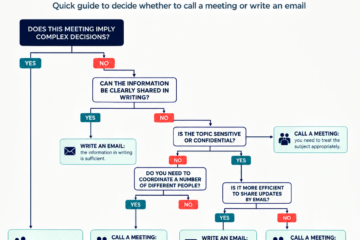
The rule we would propose at Meetingitis is quite simple:
If we need immediate interaction, think synchronous.
If we need to share information, context or feedback, think asynchronous first.
What Meetingitis problems can it solve?
This is where things get interesting.
Asynchronous communication isn’t just a productivity trend.
It is a tool for tackling some of the classic symptoms of Meetingitis.
1. Follow-up meetings
“Let’s review how the project is going.”
We can probably do this through a weekly update.
What we have achieved.
What is blocked.
What we need.
What comes next.
Without 12 people connecting for 45 minutes.
2. Informational meetings
One person talks.
The other ten listen.
This is exactly the type of interaction that can work very well through a recorded video, document or message.
3. Recurring meetings
“The Monday meeting.”
Why does it exist?
If the answer is simply:
“Because we’ve always had it.”
we have a perfect candidate for experimenting with an asynchronous format.
4. Meetings across time zones
Barcelona.
New York.
London.
Mexico.
Singapore.
Trying to find a time that works for everyone can become a small planning project in itself.
Asynchronous communication eliminates the problem at its root.
5. Back-to-back meetings
One meeting ends.
Another starts.
And another.
And another.
Asynchronous communication gives us back something that is becoming increasingly scarce:
space between meetings.
Does it really work?
There is some interesting data.
Atlassian surveyed 5,000 knowledge workers across four continents in 2024 and found that meetings were the main barrier to productivity. 76% said they felt exhausted on days with many meetings, and more than half said they worked extra hours on some days because meetings prevented them from finishing their work during the working day.
And here is a particularly interesting experiment.
Atlassian launched an internal challenge to replace a meeting with a Loom video.
In two weeks:
43% of employees replaced a meeting with a Loom.
The result:
5,000 hours freed up for focused work.
This doesn’t mean Loom is going to solve Meetingitis.
It means something much more interesting:
some meetings can disappear without collaboration disappearing.
The asynchronous tools market in 2026
The good news is that we don’t need to invent the technology.
It already exists.
The question is how to use it correctly.
1. Loom
Probably the tool that most clearly represents the concept of “replace a meeting with a video.”
It allows you to record your screen, camera or both and share the video so that people can watch it whenever they want. Loom currently positions itself as an asynchronous video platform for work and states that it has more than 25 million users across 400,000 companies.
Loom — asynchronous video for work
Ideal for: updates, presentations, explanations, demos and visual feedback.
Pros
- Very easy to use.
- Provides much more context than an email.
- Excellent replacement for certain informational meetings.
- Particularly useful for distributed teams.
Cons
- Can create a difficult-to-manage library of videos.
- Not everything needs to be a video.
- Complex conversations are still better handled live.
2. Slack
Slack can be used both synchronously and asynchronously.
The key is how you use it.
Its Clips feature allows users to send videos, audio or screen recordings without organising a meeting. They can then be viewed whenever each person wants, with captions and transcripts. Slack states that, in a customer follow-up survey, Clips users reported 51% fewer scheduled meetings between teams.
Slack
Ideal for: daily communication, updates, team conversations and small decisions.
Pros
- Already present in many companies.
- Highly flexible.
- Clips + Canvas + channels allow communication and documentation to work together.
- Strong integration ecosystem.
Cons
- Can become another source of interruptions.
- “Asynchronous” does not mean responding immediately to every message.
- Without clear rules, it can create digital Meetingitis.
3. Microsoft Teams
For many multinational companies, this will probably be the most logical option because it is already part of the Microsoft 365 ecosystem.
Teams allows messages, channels, documents and also video or audio clips that can be sent without requiring a meeting. It currently allows clips of up to one minute to be recorded directly in chats or channels.
Microsoft Teams
Ideal for: companies already working with Microsoft 365.
Pros
- Integration with Microsoft 365.
- Widely used by large organisations.
- Chat, files, channels and meetings in the same environment.
- Allows organisations to introduce asynchronous practices without adding another platform.
Cons
- Can still encourage a “meeting-first” culture.
- The number of features can make adoption more complicated.
- Clips are more limited than those of a specialised platform such as Loom.
4. Asana
Asana has one major conceptual advantage:
the conversation is connected to the work.
An update can live inside the project, alongside tasks, documents and owners.
Its 2026 guidance recommends using asynchronous communication for updates, documentation and collaboration across time zones, while reserving synchronous communication for emergencies, sensitive topics, brainstorming and interpersonal connection.
Asana
Ideal for: project management and teams looking to reduce status meetings.
Pros
- Context is connected to the work.
- Excellent for project follow-up.
- Reduces the need for status meetings.
- Strong approach for distributed teams.
Cons
- Doesn’t replace complex conversations well.
- Requires discipline when providing updates.
- Can become another system to maintain.
5. ClickUp
ClickUp combines work management, documents, comments and asynchronous communication.
It also has a specific approach to async meetings, including stand-ups and asynchronous updates.
ClickUp
Ideal for: companies looking to bring project management and communication together.
Pros
- Very comprehensive.
- Documents + tasks + comments.
- Good environment for asynchronous updates.
- AI integrated into the ecosystem.
Cons
- Can become overly complex.
- Requires good governance.
- The tool itself cannot fix a poor meeting culture.
6. Miro
Miro takes a different approach.
It doesn’t simply try to replace a video call.
It allows people to work on the same problem at different times.
Its guide to asynchronous work is based precisely on this idea: working on the same problem, but at different times. In its research with 2,228 knowledge workers, only 4% said they never encountered meetings that could have been handled asynchronously.
Miro
Ideal for: workshops, ideation, design and visual collaboration.
Pros
- Very strong for creative work.
- Allows preparation before a meeting.
- Can turn part of a workshop into asynchronous collaboration.
Cons
- Doesn’t replace every meeting.
- May require facilitation.
- Boards can become complex.
Quick comparison
The objective is not to replace every meeting with a tool.
The objective is to choose the right communication format for the outcome we need.
And sometimes, the best meeting…
is the one we don’t need to have.
Quick comparison
| Tool | Main format | Replaces meetings | Documentation | Async video | Work management | Best use |
| Loom | Video | ⭐⭐⭐⭐⭐ | ⭐⭐⭐ | ⭐⭐⭐⭐⭐ | ⭐ | Updates / demos |
| Slack | Chat + Clips | ⭐⭐⭐⭐ | ⭐⭐⭐⭐ | ⭐⭐⭐⭐ | ⭐⭐⭐ | Communication |
| Teams | Corporate suite | ⭐⭐⭐ | ⭐⭐⭐⭐ | ⭐⭐⭐ | ⭐⭐⭐⭐ | Large organisations |
| Asana | Work management | ⭐⭐⭐⭐ | ⭐⭐⭐⭐⭐ | ⭐⭐ | ⭐⭐⭐⭐⭐ | Projects |
| ClickUp | Work management | ⭐⭐⭐⭐ | ⭐⭐⭐⭐⭐ | ⭐⭐⭐ | ⭐⭐⭐⭐⭐ | All-in-one |
| Miro | Visual collaboration | ⭐⭐⭐ | ⭐⭐⭐⭐ | ⭐⭐ | ⭐⭐⭐ | Workshops |
Important: there is no single “best asynchronous communication tool.”
There is the right tool for each type of work.
The big problem: we can create asynchronous Meetingitis
And here’s the trap.
We remove the meetings.
But we add:
20 Slack messages.
15 comments.
7 notifications.
3 documents.
2 Looms.
And we expect everyone to respond immediately.
We’ve eliminated the meeting, but created another form of interruption.
Asynchronous communication only works if it is genuinely asynchronous.
In other words:
I don’t expect you to respond now.
This requires a cultural shift.
Not just a technological one.
How to implement asynchronous meetings in a company
My recommendation would be to start small.
Step 1. Identify candidate meetings
For two weeks, analyse your meetings and classify them:
- Decision
- Creativity
- Information
- Follow-up
- Coordination
- Relationship
Information and follow-up meetings are the first candidates.
Step 2. Choose a tool
Don’t implement six.
If the company already uses Teams, start with Teams.
If it uses Slack, use Clips and Canvas.
If you need video, try Loom.
If work is closely connected to projects, use Asana or ClickUp.
Step 3. Define rules
For example:
- Information → asynchronous.
- Status updates → asynchronous.
- Complex decisions → synchronous.
- Emergencies → synchronous.
- Brainstorming → probably synchronous.
- Document feedback → asynchronous.
Step 4. Run a pilot
Don’t try to change the entire company.
Start with one team.
Choose one recurring meeting.
Replace it for four weeks.
And measure.
Step 5. Compare
Before:
- number of meetings
- hours
- participants
- cost
After:
- meetings eliminated
- hours recovered
- response time
- decision quality
- satisfaction
- perceived productivity
Because the goal isn’t to have fewer meetings.
It is to generate more value with the same amount of time.
Our recommendation at Meetingitis
If I had to establish one general rule for a multinational in 2026, it would be this:
Don’t ban meetings.
Don’t make everything asynchronous.
Design a collaboration system that decides when we need to be together and when we don’t.
And I would start with three very specific moves:
🥇 1. Replace informational meetings with asynchronous communication
Video, document, message or update.
🥈 2. Turn recurring follow-up meetings into asynchronous updates
And reserve synchronous time for the problems that genuinely require conversation.
🥉 3. Protect focus time
Because eliminating a meeting and filling that gap with messages isn’t productivity.
It’s Meetingitis 2.0.
The question we should be asking
Before scheduling a meeting, perhaps the question shouldn’t be:
“When can we meet?”
But:
“Do we really need everyone to be here at the same time?”
If the answer is no, you may have just found one of the simplest ways to fight Meetingitis.
And if you want to know where to start in your company, our Meetingitis Method starts precisely there: diagnosing how your organisation is meeting before deciding which meetings should be eliminated, redesigned or converted into asynchronous communication.
Sources & recommended reading
- Atlassian — Meeting overload is real — international research on meeting overload and asynchronous alternatives.
- Atlassian — State of Teams 2026 — 2026 research involving 12,035 knowledge workers and 173 Fortune 1000 executives.
- Asana — Synchronous vs. asynchronous communication — guide updated in June 2026 with practical criteria for deciding when to use each format.
- Miro — The Asynchronous Work Guide — useful perspective on asynchronous collaboration.
- Microsoft Work Trend Index — Microsoft’s global research on how work is changing.

0 Comments